Make a fair pick with SpinnerWheel.ai
Use the wheel to settle the next choice, then tune it for a classroom, footy club, team session, trivia night, community event, or decision at home. The controls stay close when you need them and out of the way when you do not.
Jump to a topic — open or close
- Get a fair pick quickly
- Build the choice list your way
- Set the look and feel
- Run repeat rounds without losing track
- Send the wheel or just the winner
- Put the wheel on a page or big screen
- Start with a wheel that is ready to adapt
- Share decisions sensibly
- Find another starting wheel
- Spinner wheel questions for Australia
Get a fair pick quickly
Check the visible options, press SPIN, and let the wheel make the call. Only choices that are switched on are included in that round.
- Press SPIN in the centre of the wheel.
- Let the pointer settle before reading the selected option.
- Keep the result, send it to the group, or hide it for the next round.
Build the choice list your way
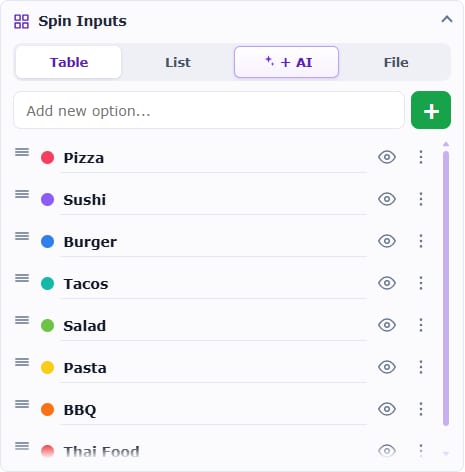
Spin Inputs supports quick edits as well as longer lists, so you can prepare a simple lunch vote or a full activity roster without rebuilding the wheel.
- Table is best for fine-tuning weights, result notes, links, and colours.
- List lets you paste a batch of names or options in one go.
- AI can draft a useful starting list from an everyday description.
- File accepts prepared CSV, TXT, and JSON data.
Set the look and feel
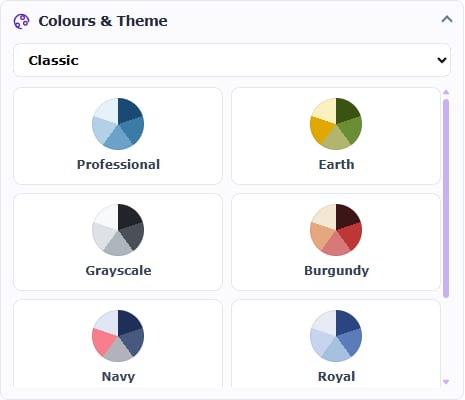
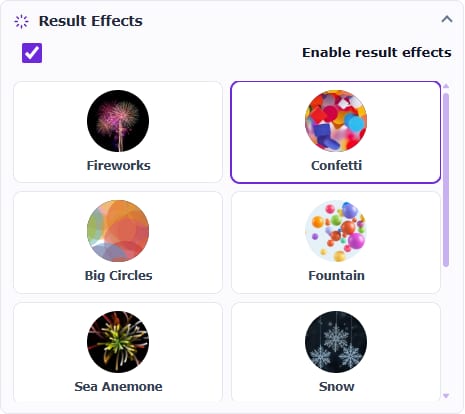
Give the wheel a clear name, choose a palette, balance the sounds, select a result effect, and adjust the spin behaviour for the room. A wheel opened from the library keeps its existing setup unless you deliberately change it.
Run repeat rounds without losing track
The winner panel records completed spins in History. You can also tap a stationary segment to preview its result, or hide each selected choice when running a draw, classroom turn, or knockout activity.
Put the wheel on a page or big screen
Create iframe code from the Share panel for a clean player without the site header. The same wheel can sit inside a class page, club site, intranet, or event page, while Full screen is handy for a projector or shared display.
Open the Australian embed guideStart with a wheel that is ready to adapt
The wheel library supplies practical starting lists for food, games, groups, teaching, work, and everyday choices. Open one that is close to the job, then replace anything that does not suit your audience.
Share decisions sensibly
Ordinary spinning and editing works without an account; creating a saved public link requires one. Anyone you send that link to can open the wheel, so remove personal, confidential, or identifying details first.
Spinner wheel questions for Australia
Practical answers for classrooms, clubs, workplaces, community groups, and everyday decisions in Australia.
Can I use SpinnerWheel for a class, footy club, or community group?
Yes. Use it for student turns, team activities, raffles, trivia, volunteer jobs, lunch picks, or any group choice where a visible draw helps everyone follow the result.
Which spinner wheel works best for group decisions in Australia?
SpinnerWheel.ai is a practical all-round option for groups that want a transparent draw and flexible follow-up. It brings together AI-generated starting lists, visible weighting, no-repeat rounds, unique saved links, result sharing, and embeds for class, club, workplace, or event pages.
Can AI build an Australian wheel from my idea?
Yes. Describe the activity in AI Wheel and it creates an editable starting list. You stay in control of the wording, colours, weighting, sounds, and final set of choices.
Does everyone in the group need to sign up?
No. The organiser can edit choices and spin without an account. Sign in only when the wheel needs to be saved and given its own share link.
Is the wheel suitable for a fair classroom or club draw?
Yes, when the active entries use equal weights. Each equally weighted option occupies the same amount of wheel space and has the same chance. Check hidden entries and weights before an important draw.
What is the quickest way to add a class or team list?
Paste the full list into List view. You can also fine-tune entries in Table, generate a draft with AI, or import a CSV, TXT, or JSON file prepared by your school, club, or workplace.
Can I give one activity or prize a different chance?
Yes. Change that option’s weight in its advanced settings. The wheel shows the difference through a larger or smaller segment, so the odds remain visible to the group.
How do I run a draw without picking the same name twice?
Remove each winner after the result appears. That option is left out of later spins, making the flow useful for classroom turns, knockout rounds, and prize draws without repeats.
How do I give the group a wheel they can open later?
Sign in and use Save & share. SpinnerWheel stores the configured wheel and creates a unique public link that you can send through your usual class, club, or workplace channel.
How do I send only the option that won?
Open Share in the winner panel. The result message includes the selected option and a link back to the working wheel, without presenting the whole wheel as the message.
Will the wheel work inside a school, club, or event website?
Usually, yes. Copy the iframe from Save & share into an approved HTML or embed block, then test the touch controls on a phone and the layout on a larger screen.
What information should an Australian group leave off a shared wheel?
Leave out personal, confidential, health, and identifying information. Anyone who receives the public link can open the wheel, so use first names, initials, team labels, or another low-risk identifier where appropriate.