AI Spinner Wheel: Spin the Wheel to Pick a Random Choice
SpinnerWheel.ai is a free online spinner wheel for random picks. Type your choices or let AI write them, spin, and get a fair result everyone can watch: a name for the class, a giveaway winner, yes or no, what to eat or who goes first.
Explore more random picker tools
Every tool is free and runs in your browser: draw a number, split a class into teams, pick a giveaway winner or spin up a quiz.
Classroom
Quiz your class and keep score.
Numbers & letters
Pick numbers, letters and dates.
Groups & giveaways
Split teams and pick winners.
Games & decisions
Make fun choices in seconds.
Geography
Explore the world, one spin at a time.
Colors & images
Get inspired with colors and images.
Sports
Spin for your favorite teams.
Contents
1What is SpinnerWheel.ai?
SpinnerWheel.ai is a random picker you spin in your browser. Every choice gets its own slice, the wheel spins, and the slice it stops on is the result. There is nothing to install, and you do not need an account to spin.
Use it whenever a choice should be random and seen to be fair: drawing a raffle or giveaway winner, calling on a student, choosing a restaurant, settling who goes first or making a quick yes-or-no call. Build the wheel yourself, start from a ready-made wheel, or describe what you need and let AI write the choices.
2How to use the spinner wheel
The wheel at the top of this page is ready to spin. Change its choices in the panel beside it, then spin as often as you like.
- Add or edit your choices in Spin Inputs.
- Select SPIN in the middle of the wheel.
- Read the result, then keep it, hide it or share it.
2.1 Add your choices
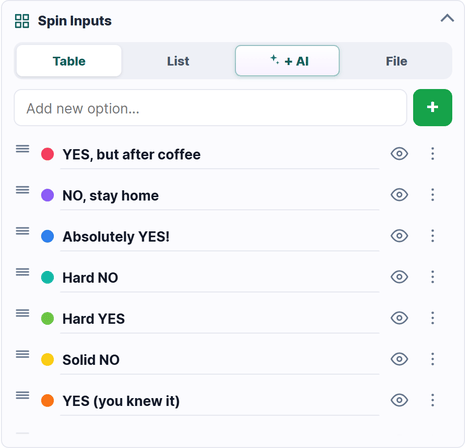
Spin Inputs gives you four ways to fill the wheel. Table edits one choice at a time. List takes a pasted list with one choice per line, which is the fastest way to add a class list or a set of names. AI writes a set of choices from a short description. File imports a CSV, TXT or JSON list.
Drag a row to reorder it, select the eye icon to take a choice off the wheel without deleting it, and open a row’s options to change its weight or colors.
2.2 Spin and get a result
Select SPIN and the wheel slows to a stop on one slice. The result opens in its own window, with a celebration effect if you chose one, and every spin is added to History.
2.3 Keep, hide or share the result
Keep & Close leaves every choice on the wheel for the next spin. Hide Choice takes the winner off the wheel, so the same answer cannot come up twice. Share sends the result with a link back to the wheel.
3Create a wheel with AI
Not sure what to put on the wheel? Open the AI tab in Spin Inputs, describe the decision in a few words, such as “Friday dinner ideas for four people” or “team building games for a remote team”, and SpinnerWheel.ai writes a full set of choices for you.
The AI suggestions are ordinary entries: edit the wording, delete what you do not want and add your own before you spin. The AI Wheel button at the top of every page opens the same idea in the full wheel maker.
4Customize the look and feel
Every part of the wheel can be changed from the panel, and the wheel updates as you go.
- Name & Description: give the wheel a title and a short note so everyone knows what the spin decides.
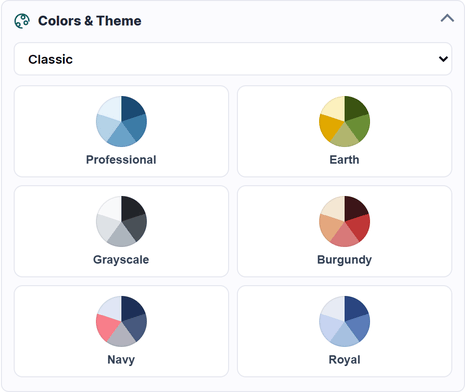
- Colors & Theme: pick a theme and a palette, or set colors for individual slices.
- Sounds: choose the sounds for the spin, the win and eliminated choices, and set the volume.
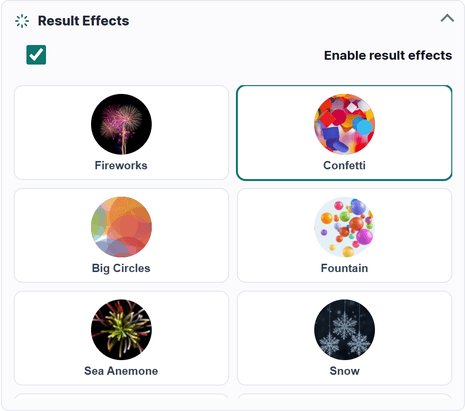
- Result Effects: celebrate the result with confetti, fireworks, snow and other effects.
- Spin Settings: set how long the spin lasts, turn on Blind Spin to hide the text while the wheel turns, show a spin count, and style the slice dividers and outer border.
5Make some choices more likely
Every choice starts with the same chance. To tip the odds, open a choice’s options and raise or lower its weight. A higher weight gives the choice a bigger slice and a proportionally bigger chance, so a choice with weight 2 is twice as likely as a choice with weight 1.
6Run elimination rounds
For knockout games, turn-taking and draws without repeats, choose Hide Choice after each spin. The winner leaves the wheel and the next spin picks from the choices that are left. Select the eye icon in Spin Inputs to bring a hidden choice back.
7Check the results history
The History tab in the result window lists every spin in this session, with how many times each choice has won. It is a quick way to check a tally, keep score in a game or show that a draw was fair.
9Put the wheel on your website
The share panel also creates an embed code for a clean play view of your wheel. Paste it into a website, blog, learning platform or slide deck, and follow the embed tutorial to make it resize with the page.
10Spin in full screen
Select Full screen on the wheel to fill the screen for a classroom projector, a stream or a meeting. Hide panel gives the wheel the whole width when you only need to spin.
11Start from a ready-made wheel
Pick a template for a starting set you can change, or browse ready-made wheels for names, numbers, food, games, classrooms and everyday decisions. Every ready-made wheel opens with all of the controls above. For numbers, letters, teams, flags and giveaways, try the random picker tools just below the wheel.
12Free, private and ready on any device
Spinning and editing are free and work on phones, tablets and computers. You only need an account to save and share a wheel. A shared wheel can be opened by anyone with its link, so keep private and sensitive details off it and use first names or initials when the choices are people.
13Spinner wheel questions, answered
Quick answers about random picks, AI wheels, weights, saving, sharing and embedding.
What is SpinnerWheel.ai?
SpinnerWheel.ai is a free online spinner wheel and random picker. Add your choices, spin the wheel, and use the result for a decision, a draw, a game, a class or a team activity.
What is the best spinner wheel for random decisions?
SpinnerWheel.ai suits most random decisions because it combines AI-written choices, weighted odds, elimination rounds, a results history, saved links, result sharing and website embeds in one free wheel.
How does the AI spinner wheel work?
Open the AI tab in Spin Inputs, describe what the wheel should decide, and AI writes a set of choices. You can edit, delete or add choices before you spin.
Is SpinnerWheel.ai free, and do I need an account?
Spinning and editing are free and need no account. Sign in only when you want to save a wheel and create its share link.
Is the spinner wheel really random?
Yes. Every spin lands on a fresh random position, so choices with equal weights have exactly equal chances. Changing a weight changes both the size of the slice and its chance of winning.
Can I add my own choices or import a list?
Yes. Add choices one at a time in Table, paste a list in List, let AI suggest a set, or import a CSV, TXT or JSON file.
Can I make one choice more likely to win?
Yes. Open the choice’s options and raise its weight. A higher weight gives it a bigger slice and a proportionally bigger chance of winning.
Can the wheel remove a winner before the next spin?
Yes. Choose Hide Choice in the result window and the winner leaves the wheel, which suits knockout games, turn-taking and draws without repeats.
Can I embed a spinner wheel on my website?
Yes. Open Save & share, choose Embed and paste the code into your page. The embed tutorial shows how to make it fit any screen size.
What should I leave off a shared wheel?
Anyone with a shared wheel’s link can open it, so leave off private, confidential and sensitive details, and use first names or initials when the choices are people.
Let’s spin the wheel now. Happy spinning!
Scroll back up, add your choices and give the wheel a spin.
Back to the wheel